SNX Solutions
DEEN Start a project

Custom software & SaaS

Software that fits how you work.Not the other way round.

Custom software for the way you actually work, where no off-the-shelf product fits. Plus two SaaS products of our own — all of it proven in our own company.

  • Proven in our own company
  • Hosted in Germany/EU
  • Runs in the browser — nothing to install
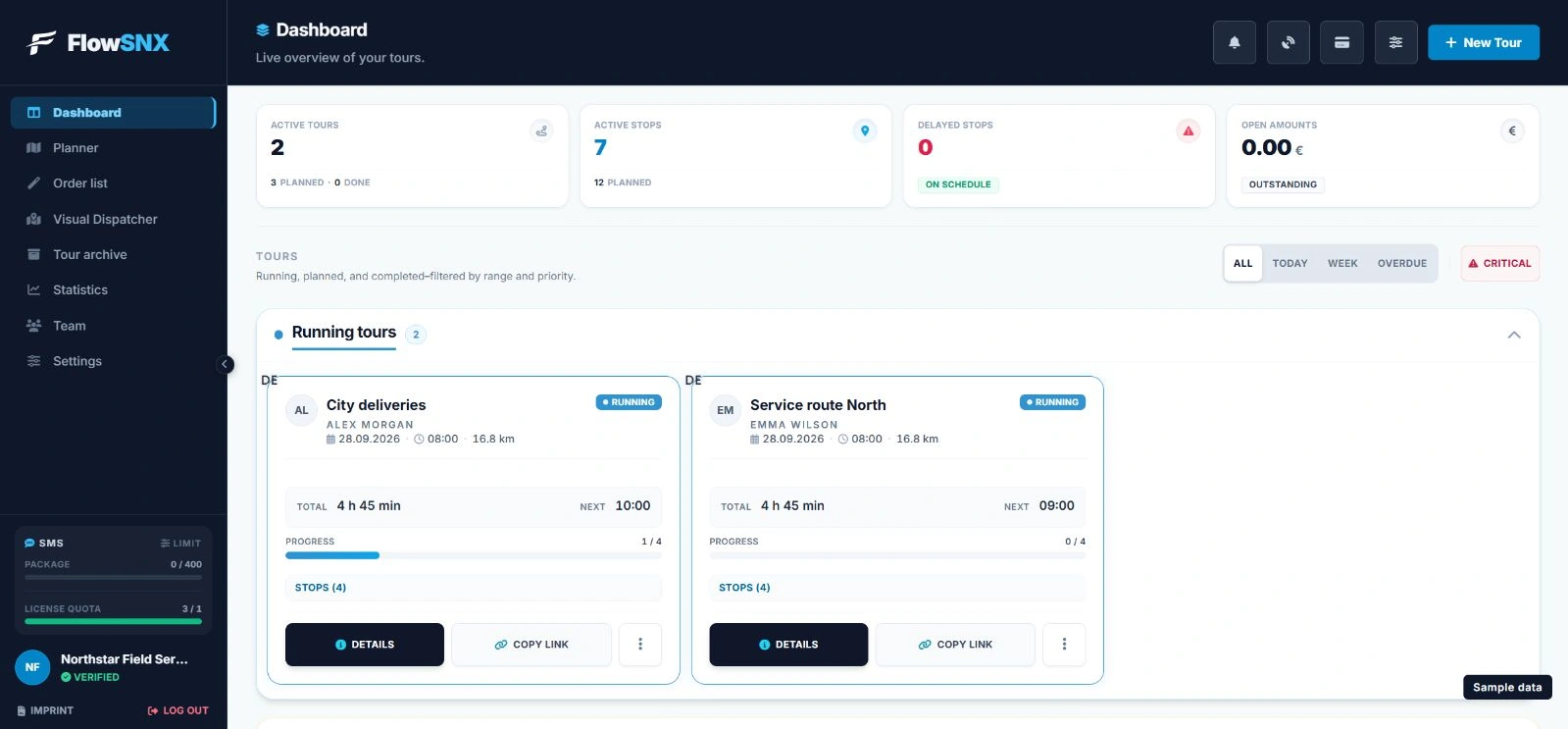
flowsnx.com · DashboardBeta
FlowSNX dashboard: active routes, critical stops and open amounts at a glance
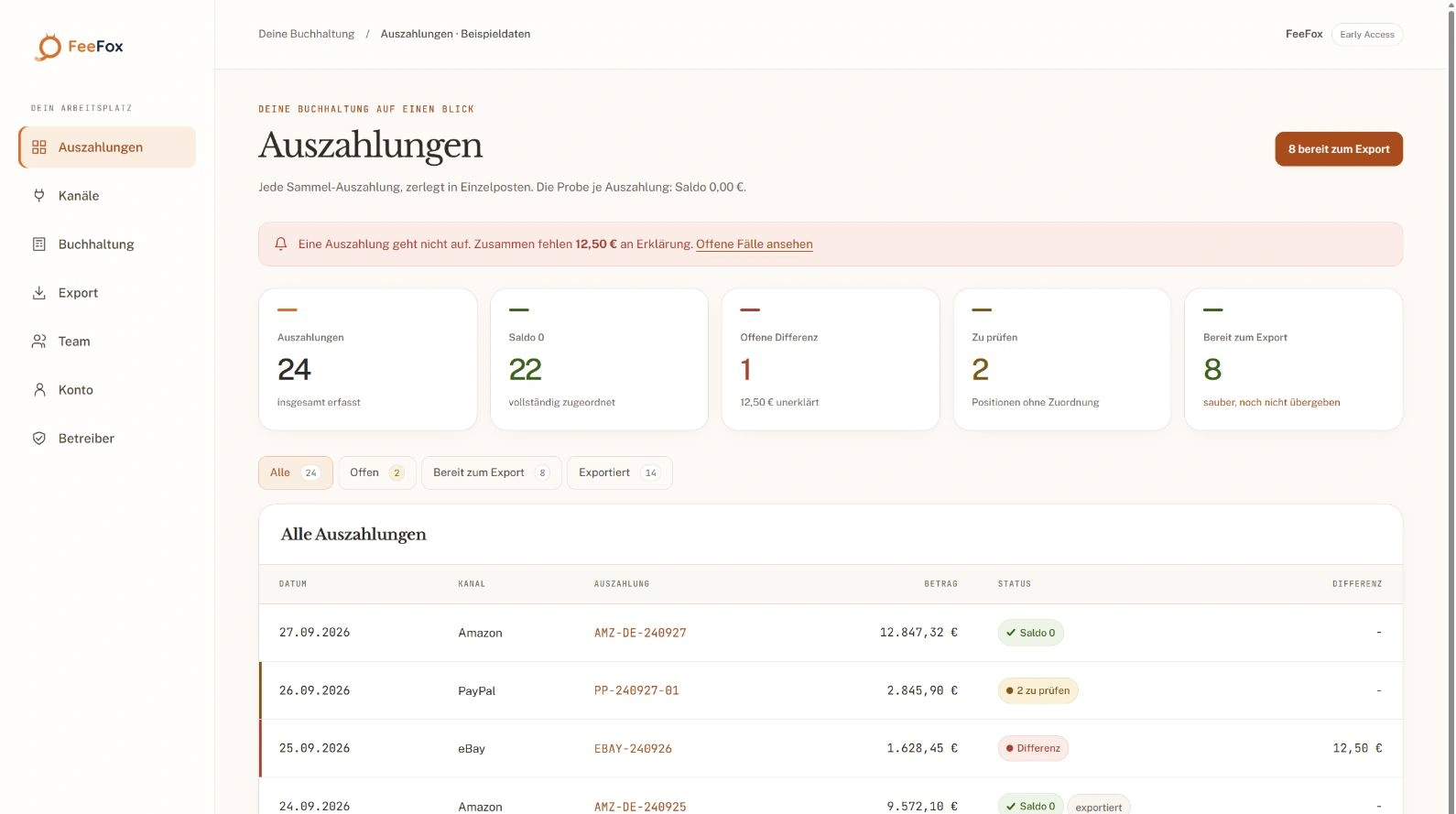
feefox.deEarly Access
FeeFox: a lump-sum payout is broken down into line items until the balance reaches zero
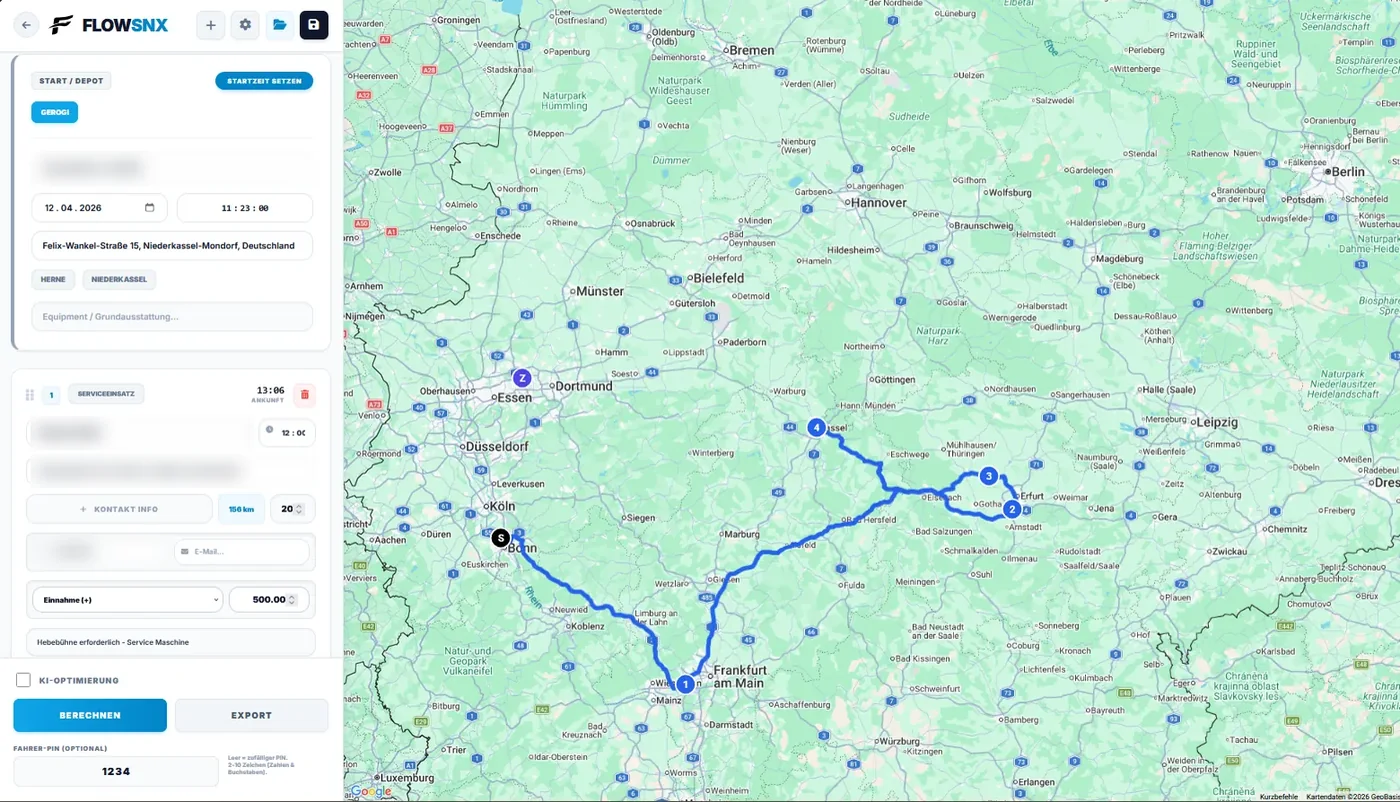
flowsnx.com · PlannerBeta
FlowSNX route planner: stops in the sidebar, optimised route on the map
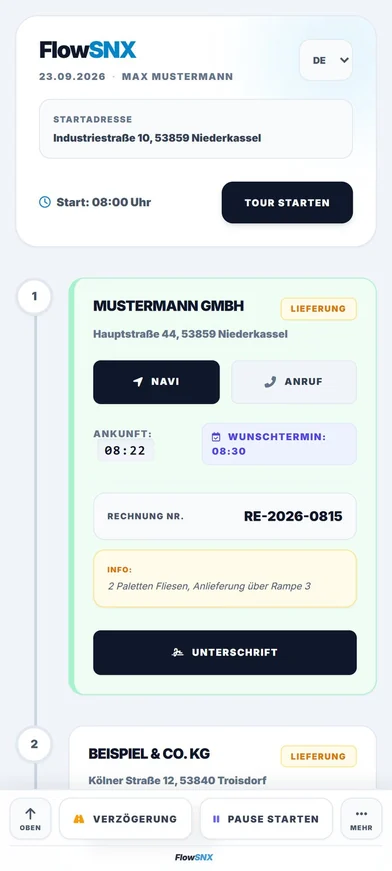
FlowSNX LiveLink on a phone: the customer sees their time slot and can reply to the driver
View live

Custom software

One app for the whole workshop day.

Plotter-FIX is a wide-format print dealer: machines across two sites, engineers on the road, thousands of spare parts. Four jobs for which no off-the-shelf software fit — today they sit in one app. The most important one comes first here.

Plotter-SNX Runs in the browser — and as an installable Android app for the engineers. Sign-in required: internal software, not a public product.

01

AI assistant for troubleshooting

A chatbot that has read your own manuals.

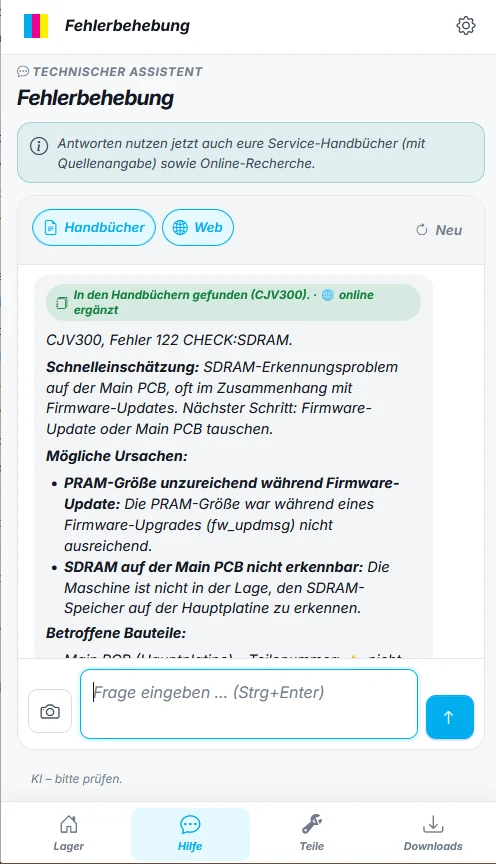
Type in the error code or photograph the display — the answer comes from the company's own stock of service manuals, not from general web knowledge. And it says where it came from.

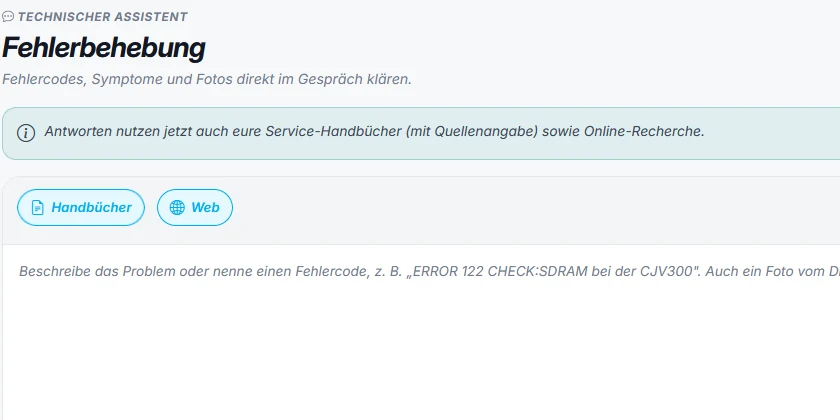
  • Answers from more than 900 in-house manuals — quoting the source. Checkable instead of guessed.
  • Reads a photo of the display — no typing, even when the code sits behind a flap.
  • Adds online research on request — listed separately, so it stays clear what came from the manual.
  • Answers in working order — quick assessment, likely causes, affected parts, next step.

Before, that meant: find the right folder, find the right PDF, find the right page. And at the customer's site it meant a call to the office.

Plotter-SNX troubleshooting: a note that answers now use the company's own service manuals with source references, plus a toggle between manuals and web
Plotter-SNX on a phone: answer to error 122 CHECK:SDRAM with a quick assessment, likely causes and a note that the answer was found in the manual
02

Machine stock across two sites

What is where — without asking anyone.

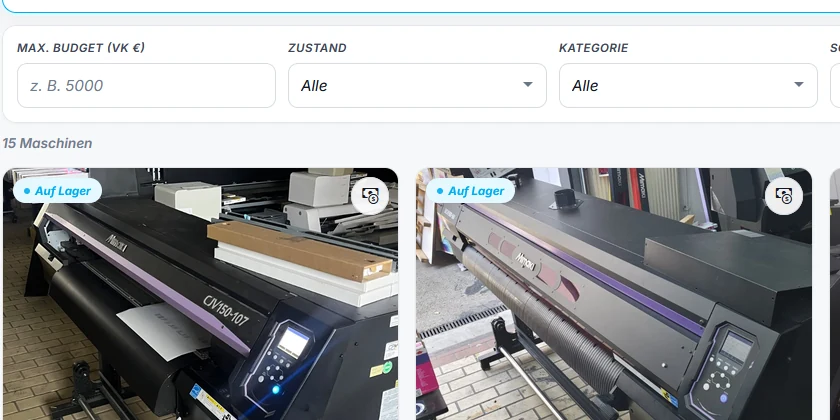
Every machine with its part number, year, running hours, condition and location. Filterable by in stock, reserved, sold and archived, searchable by brand, model or part number. If a customer asks for something up to a certain budget, a price limit narrows the results.

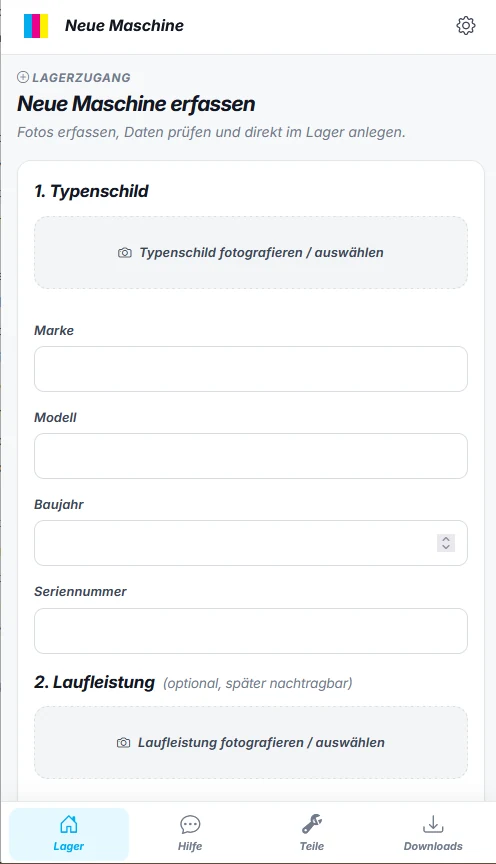
New machines are on the system before they are in the van: photograph the type plate, check the data, done. What used to travel back as a note and get typed up in the evening.

Plotter-SNX stock: filters for budget, condition and category, below them machine cards with photo, part number, year and condition
Plotter-SNX on a phone: adding a new machine, starting with a photo of the type plate
03

Downloads

The whole file library, on site as well

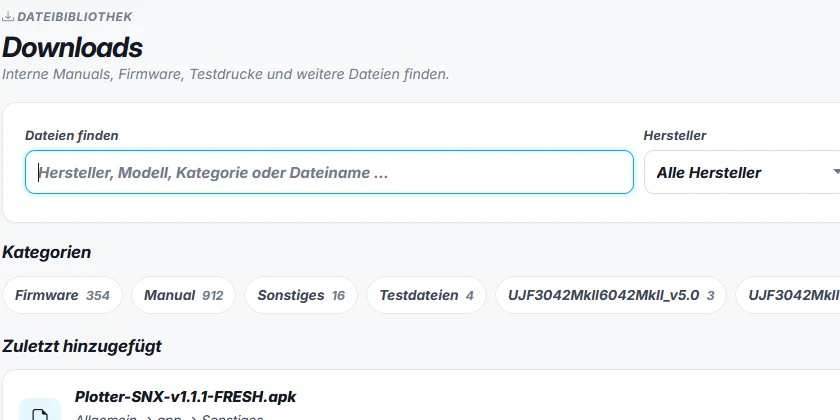
More than 1,200 files in one place — over 900 manuals, around 350 firmware versions, plus test files and software. Filtered by manufacturer, model and category. Anyone who needs something on the road downloads it themselves instead of asking someone to send it over.

Plotter-SNX downloads: search by manufacturer, model and category, category chips with file counts and a list of recently added files
04

Spare parts

Number in, plain text and price out

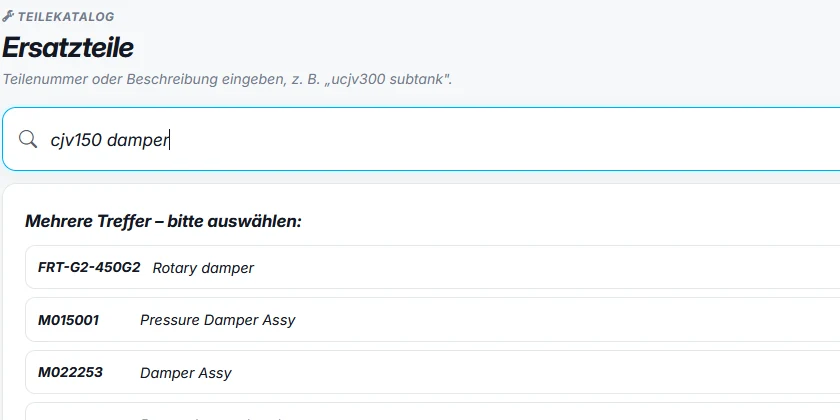
Search by part number or description. The result gives the designation, the compatible machines and the price — so sales can answer on the phone straight away, without opening three lists and without calling back.

Plotter-SNX spare parts: search for cjv150 damper, results list with part number and plain-text designation

Plotter-SNX runs in the day-to-day business of Plotter-FIX GmbH — in the browser at the office, as an app on the work phone out on the road. What works there can be carried over: the questions are usually the same in other companies.

Our own products

Two SaaS products born from a real need.

Both are still in development. Both already run and can be looked at. We show them in that state, because that is exactly what shows how we work.

FlowSNX · Dashboard
FlowSNX dashboard with active routes, progress per route and customer links
Planner
Route planner with a list of stops and the calculated route on the map
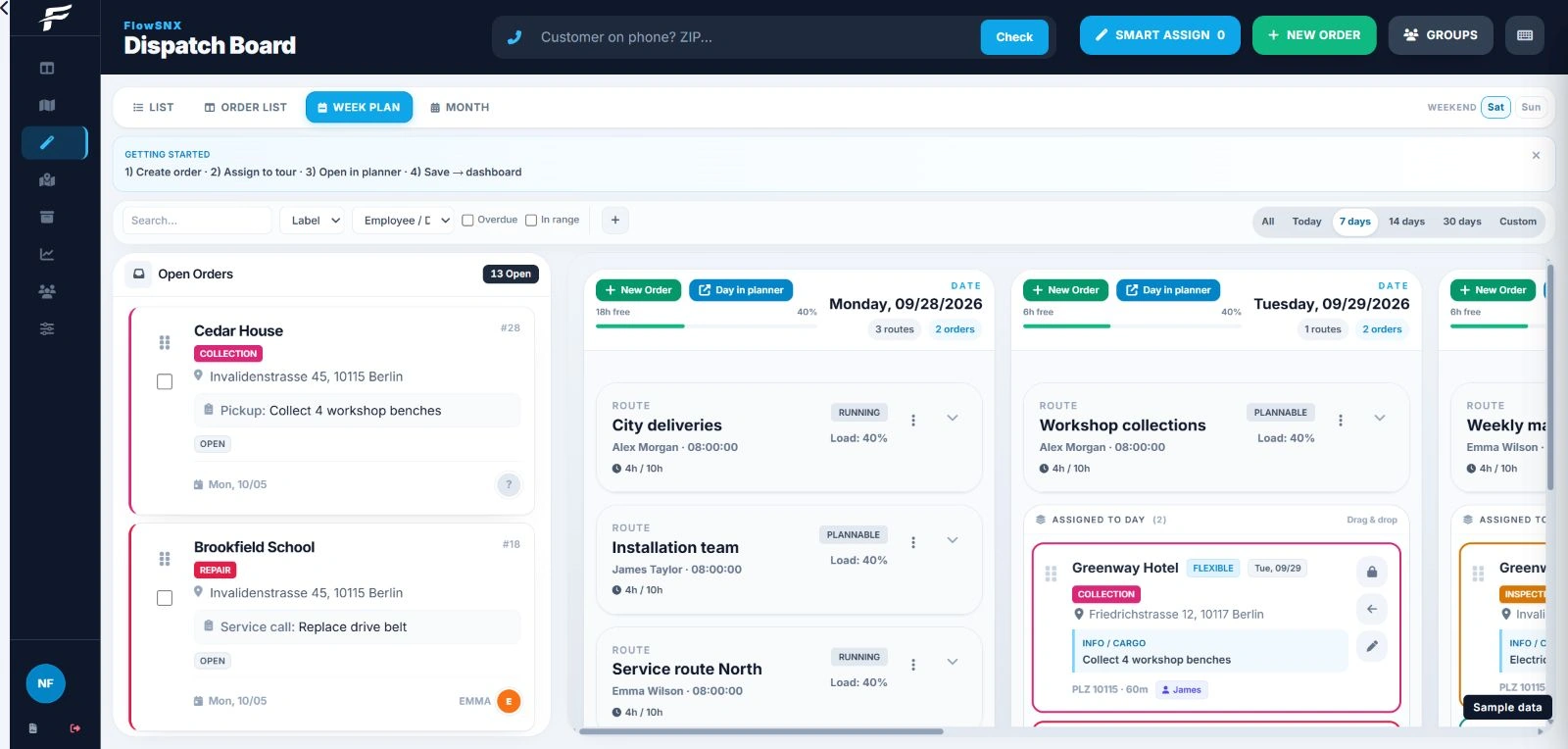
Dispatch board
Dispatch board: open jobs on the left, days with assigned stops on the right

SaaS · Job & route planning

FlowSNX

Beta

Anyone coordinating engineers, fitters or drivers usually plans in three tools at once: a calendar, WhatsApp and a printout for the glovebox. FlowSNX pulls that into one system — jobs, routes, stops and the message to the customer.

  • Plan routes by drag and drop, optimise the order automatically if you want
  • LiveLink: the customer sees their time slot and can write back
  • Digital delivery notes and service reports, signature included

Built for teams in service, trades and logistics — from one vehicle to around thirty.

The product site is currently in German.

feefox.de
FeeFox home page: a lump-sum payout of 12,847.32 euros is broken down until the balance is 0.00 euros

SaaS · Accounting & marketplaces

FeeFox

Early access

Amazon, eBay and PayPal pay in lump sums. A single transfer contains revenue, fees, advertising costs and refunds — and what is left in the books is a difference nobody can explain. FeeFox keeps breaking each payout down until the balance reaches zero.

  • Connects via OAuth — read access only, revocable at any time
  • Lump-sum payouts become bookable line items
  • Export to lexoffice, further accounting tools planned

It came out of our own trading: Plotter-FIX sells across several marketplaces — the problem landed on our own desk every month.

The plan is a flat price rather than a credit counter. Anyone in early access hears it first. The product site is currently in German.

Currently in progress

From a pile of receipts to an overview.

Till receipts are no longer sorted, they are scanned — the software does the rest. We are deliberately showing this project mid-build, with an honest status on each stage.

  1. 01

    Scan

    A Ricoh ScanSnap pulls the whole stack through in one pass.

    In use
  2. 02

    Read

    Date, merchant, amount and payment method are read off the scan — double-checked when in doubt.

    In use
  3. 03

    Name & file

    A meaningful filename, filed under its payment method — or under “unclear”.

    In use
  4. 04

    Into the cash book

    Cash into the cash book, card into the account's expense list — no typing.

    Being built
  5. 05

    Overview

    Cash on hand, spending per month, receipts per payment method — as statistics.

    Being built
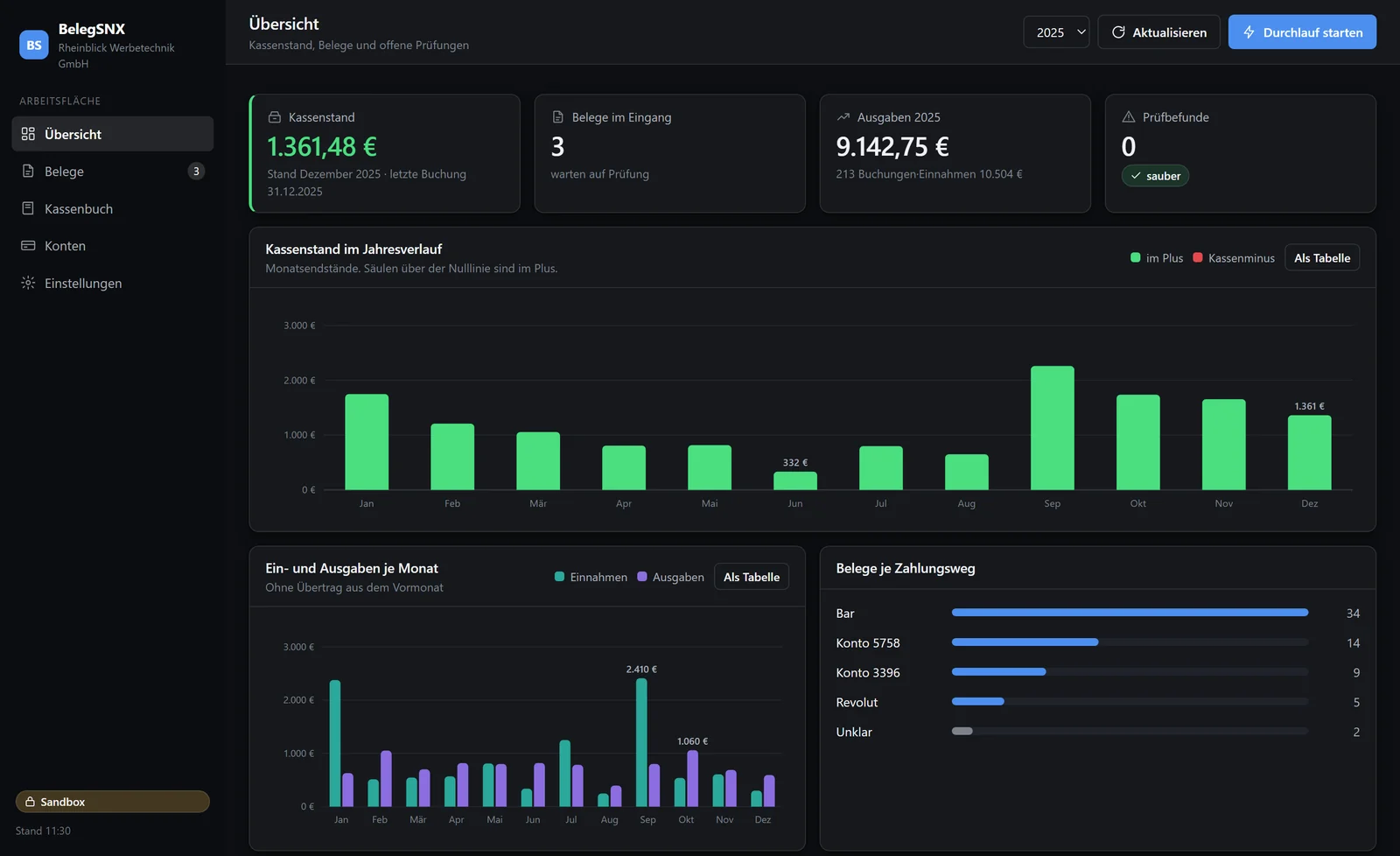
BelegSNX overview screen: cash on hand, receipts waiting, spending for the year and check findings as key figures, below them the cash balance across the year, income and spending per month, and receipts per payment method.
The running interface, captured on 26 July 2026. It shows a demo data set for a fictitious company in sandbox mode — real accounting figures do not belong on a website. The interface itself is in German.

Status: 26 July 2026. The stages are labelled the way the project actually stands — not the way it would read better. Reading has been measured against 280 real receipts; the stage being worked on right now is booking into the cash book.

How we work

Understand first, then build.

Custom software rarely fails on the technology. It fails because nobody ever wrote down how the work really happens.

  1. 01

    Watch it happen

    We look at the process as it really is. Usually the problem sits in one small step everybody considers normal.

  2. 02

    Smallest useful slice

    We build the piece that saves the biggest step first — not the whole system.

  3. 03

    Into daily use

    The team works with it, we watch and adjust. The first weeks decide everything.

  4. 04

    Keep building

    Software is never finished. We stay on it — same number, same person.

What it costs is agreed up front

  1. First conversation is free. We look at how the work actually runs and say openly whether something custom pays off at all.
  2. Fixed price per stage, in writing. Not billed by the hour: the number comes before the stage, and you decide on the next one afterwards.
  3. Operation and hosting monthly. Agreed separately and cancellable — not chained to the project as a bundle.

Who picks up

One fixed point of contact who knows the system. No ticket queue, no rotating responsibility, no handing over to someone seeing the project for the first time.

The same number for the question before the quote and for the question two years into daily use.

Honestly

When off-the-shelf is the better choice.

If the way you work matches what a finished product was built for, taking that product is almost always the smarter move: cheaper, available immediately, maintained by somebody else. We say so even when it argues against us — a project that does not pay for itself helps nobody.

When your own pays off

When people are filling the gap between two systems.

When somebody retypes data from one program into the next. When a simple question costs a phone call. When you pay for three tools to get one job done — and none of them really fits. That is when something of your own pays off, often sooner than expected.

Technology & operation

Built, run, kept growing.

Not a patchwork of several suppliers: development, hosting and operation come from one place — with one person who knows the system.

Runs in the browser

Nothing to install, nothing to update. Desktop, tablet and phone show the same system.

Hosting & operation

Servers, security updates and backups run at our end. You only notice that it works.

Permissions & privacy

Roles and access cleanly separated, GDPR-compliant, data processing agreed in writing.

Interfaces

Connections to your shop, ERP and accounting — so data stops travelling by hand.

Bring your data along

Existing lists, spreadsheets and product data are carried over — not thrown away and retyped.

Further development

Changes without a ticket odyssey: a short line, fixed contacts, a plannable schedule.

Common questions

What companies ask us first.

Honest answers — including where they argue against the job.

What does custom software cost?

It depends on the scope — but not on guesswork. We cut a project into stages and quote a fixed price per stage before we start. The first stage is always the smallest one that already saves something day to day. After that you decide whether we keep building. Operation, hosting and further development run monthly and are agreed separately.

How long until we can actually use something?

We count the first usable version in weeks, not months — because it is deliberately cut small. A system that nobody opens for six months almost always misses how the work really happens. How long the full build takes depends on the scope and is agreed up front.

We already run software — do we have to replace it?

In most cases, no. The most common job is not replacement but connection: the ERP, the shop and the accounting system all exist, they just do not talk to each other — and somebody types across the gap by hand. That is exactly where we start, using the interfaces that are already there.

Where is our data stored?

On servers in Germany or the EU, with encrypted transfer, cleanly separated roles and permissions, and regular backups. Where exactly a project runs is put in writing before the start — including the data processing agreement required under GDPR.

Can we try FlowSNX or FeeFox yet?

FlowSNX is in beta and access can be requested at flowsnx.com. FeeFox is opening early access in waves; sign-up runs through feefox.de. Both products are still in development — that is stated on their own pages just as plainly as it is here. Note that both product sites and their support are currently in German.

Do you build AI features as well?

Yes — where they save a concrete step. Troubleshooting in Plotter-SNX is one of those cases: type in the error code instead of leafing through the manual, and the answer names the place it came from in your own manual rather than inventing an explanation. Where a good search or a clean table does the same job, we do not add AI just to put the word on the invoice.

Do you work outside your region?

Yes. With software, distance hardly matters: coordination runs over video calls and the system runs in the browser. The regional focus only means that between Bonn, Cologne and the Eifel we also come by in person.

Who owns the software in the end?

For custom software we put the usage rights in writing before the project starts, not afterwards. With our own products FlowSNX and FeeFox you rent the use — in return you get operation, updates and further development without being responsible for any of it.

Something else on your mind? Just ask — free and without obligation

Free first conversation

Tell us where things get stuck.

Describe the step that eats time every single day. We will tell you straight whether a finished product covers it — or whether something of your own is worth it.